![[ AOS ] Art is Open Source](https://www.artisopensource.net/network/artisopensource/wp-content/uploads/2020/03/AOSLogo-01.png)
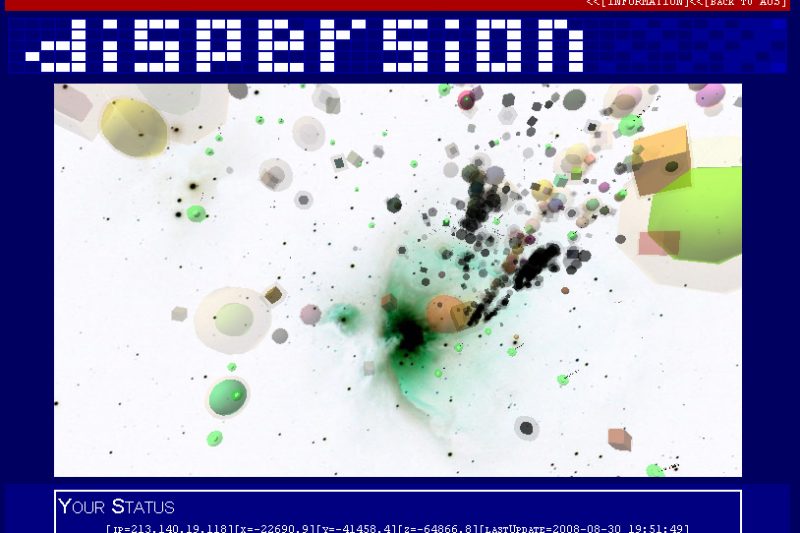
The Internet as a universe.
Dispersion harvests web links around the web, analyzes them and places them as planets in a digital universe.
In this universe physical laws exist, based on similarity and content structure.
Galaxies form, arranging similar web content around semantic orbits.
[ What This is]
DISPERSION is an open 3D universe
ready to be colonized.
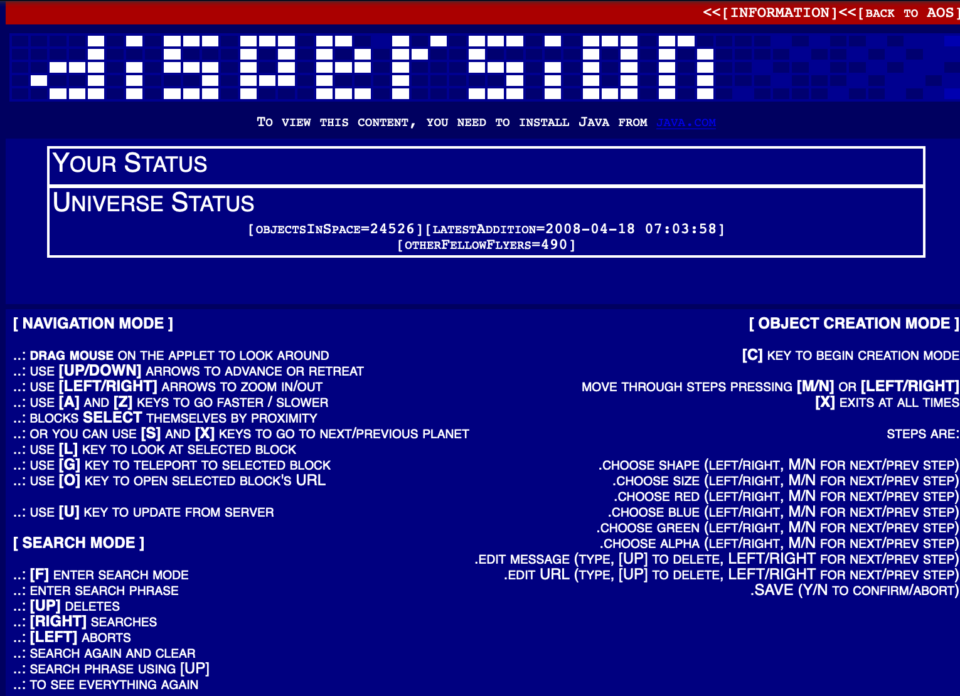
While you fly through space you can add
objects (try pressing ‘C’ and then moving
and dragging the mouse to center the view
on both object (yellow hilight) and the
green help text) pointing to web pages.
People will see the link when they fly through
DISPERSION.
Distances are great, and you can go at higher
or lower speeds by using the [A/Z] keys.
By zooming in/out with [LEFT/RIGHT] you can
change your field of vision, or even acheive
some lovely psychedelic special effects.
You can see other people who have recently been
flying: they’re the spheres with an IP adress
on them.
While you are not watching, the universe
auto-organizes itself.
New matter is created by harvesting links on
several homepages.
This below is the list of links we are currently
using
..:[ http://www.rhizome.org ]
..:[ http://www.artificial.dk ]
..:[ http://www.neural.it ]
..:[ http://www.exibart.it ]
..:[ http://www.teknemedia.net ]
..:[ http://www.flashartonline.it ]
..:[ http://www.undo.net/ ]
..:[ http://sourceforge.net/index.php ]
..:[ http://www.turbulence.org/blog/ ]
..:[ http://www.turbulence.org/ ]
..:[ http://www.processing.org/exhibition/index.html ]
..:[ http://processing.org/ ]
..:[ http://www.artnetweb.com/ ]
..:[ http://www.random-magazine.net/modules/news/ ]
..:[ http://www.random-magazine.net/modules/mylinks/ ]
In the meantime some forces operate in the
background, creating this universe’s
physical reality.
The force of gravity does not react to
objects’ mass, but on similarity.
The more two objects are similar and
farther, the more they attract each other.
Some enormous space marks perform other
vectorial forces.
..:[ The big yellow sun attracts along a
direction that goes from its center to
the origin. This force is proportional
to the content length of the web pages
pointed at by the links populating the
universe.

..:[ The coordinate space origin, operating
a sinewave-force: its cycle corresponds to
a BigBang and back.
..:[ The Big Flower.
This lovely cutie acts as a randomizing force.
The closer you are to it, the more your
position in the universe becomes randomized.
It is also pretty nice to see. (if you find it)
So, what happens is that these forces aggregate
the planets-links, which create sructures in space
that are depending on similarity (and on a whole
lots of other interesting things: mail me if you’d
like to know more or talk a bit))
We’ll watch it evolve.
What is coming out up to now is
an automatic, physical/spacial,
search-while-you-fly
search engine.
so… have a nice flight,
watch the stars and find odd things through space,
check out where other people are flying,
watch the beautiful sculptures automaically forming
in the universe
and
COLONIZE!